
View the suppliers list
See the directory of companies working on the building, filter it and export it.
- Audience
- Administrator
- Screen
- Suppliers
- Verified version
- App 1.0.0
Goal
View the directory of companies and professionals (plumber, roofer, engineering firm…) working on the building, with their contact details, specialties and RBQ licences.
Audience
Administrator of the building. The directory is reserved for administrators: it holds the board's internal notes (e.g. "Avoid" status).
Prerequisites
- None. If the directory is empty, start by adding a supplier.
Steps
-
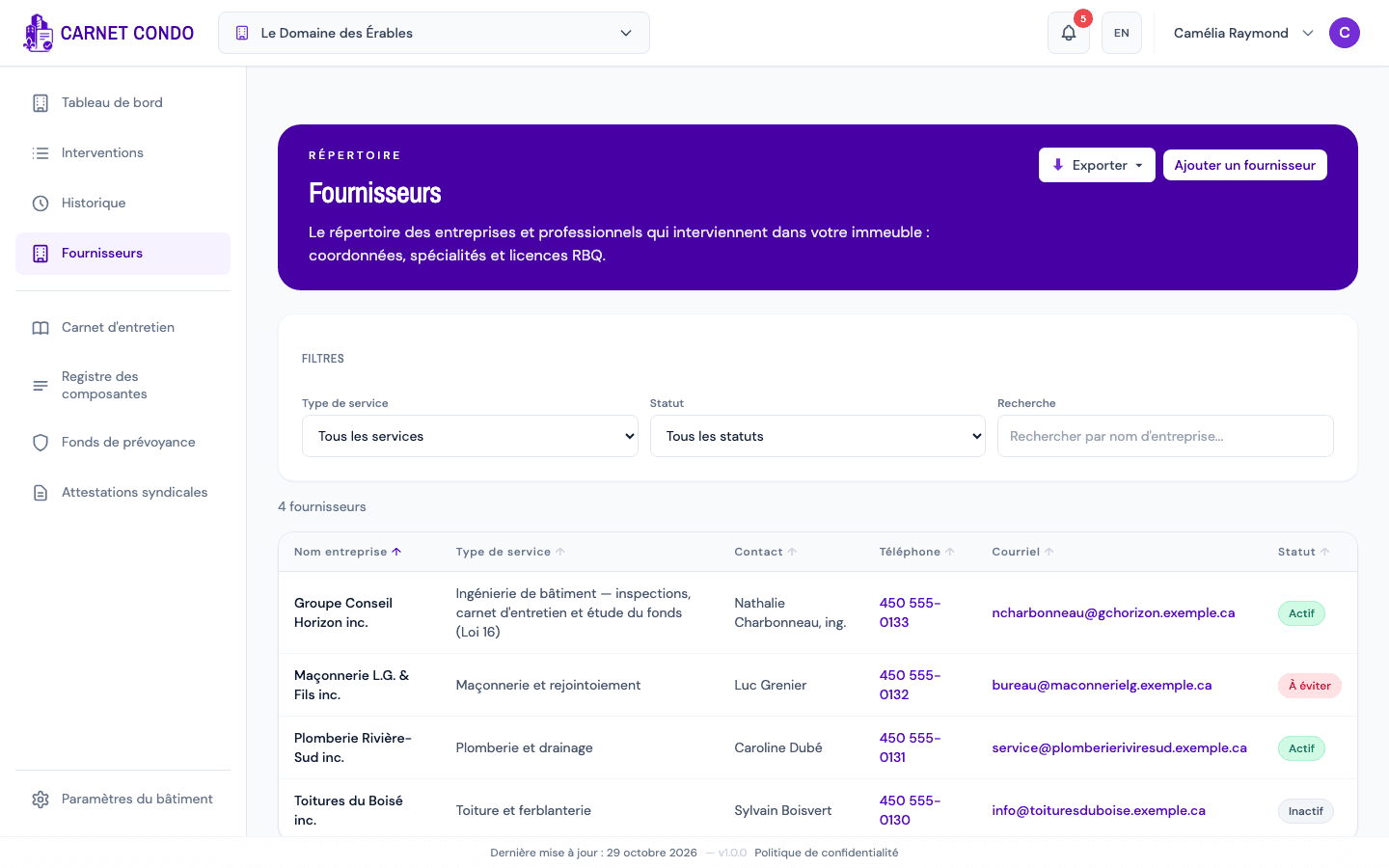
Open "Suppliers" in the left menu.
-
The table shows Company name, Service type, Contact, Phone, Email and Status. Phone and email are clickable. Click a header to sort.
-
Filter with Service type, Status (Active / Inactive / Avoid) and Search (company name). The counter shows "N suppliers" or "X of N suppliers".
-
To export the directory, click "Export", then Excel (.xlsx) or PDF (.pdf).
-
Click a row to open the supplier's record.
Statuses
Active: supplier in use · Inactive: no longer used · Avoid: do not hire again (bad experience).
Tips and common mistakes
- No "Suppliers" menu: you are not an administrator of the building.
- Empty fields: a dash means the detail was not provided.