
Resolve a non-compliance
Record that the problem on a non-compliant intervention was fixed, with a required repair note; the intervention then shows as "Resolved" without erasing the original finding (Law 16).
- Audience
- Administrator or assigned person
- Screen
- Intervention record, edit mode
- Verified version
- App 1.0.0
Goal
Record that the problem on a Non-compliant intervention has been fixed. The resolution stores the repair (note, date, author) without erasing the finding: in the database the intervention stays non-compliant (Law 16 truth), but it shows as "Resolved" in green everywhere in the app and counts as compliant in the compliance summary.
Audience
Administrator of the building or a person assigned to the intervention.
Prerequisites
- The intervention has the Non-compliant status and is not resolved yet.
- An anomaly has been described (see Mark an intervention non-compliant).
- Be an administrator or assigned to the intervention.
Steps
-
Open the intervention. A non-compliant intervention is finished: you will find it under "History" (left menu), with the orange "Non-compliant" badge.
-
In the "Information" tab, click "Edit".
-
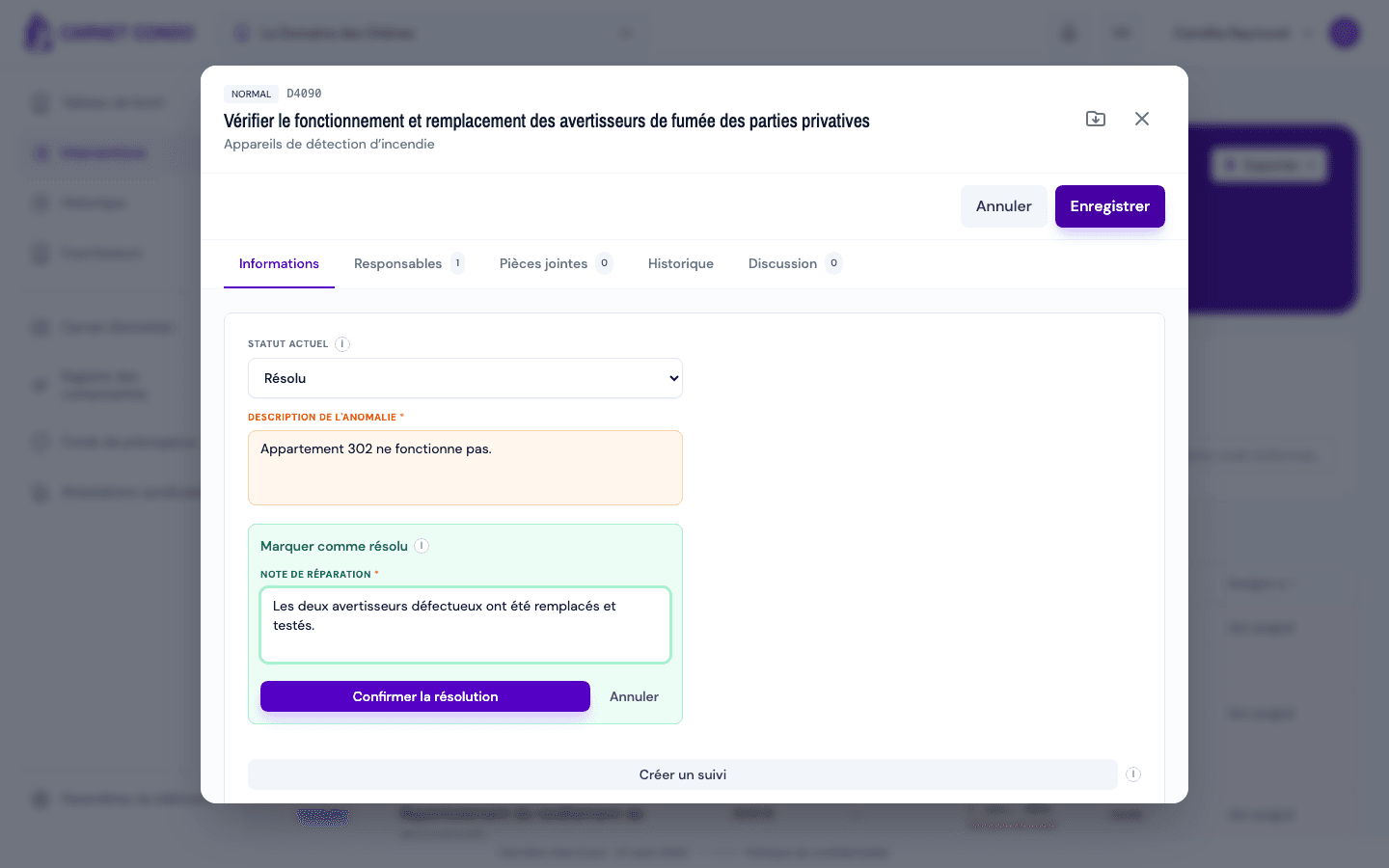
In the "Current status" menu, choose "Resolved" (last option in the list). A green "Mark as resolved" box appears below the anomaly description.
-
Enter the "Repair note" (required): describe what was repaired.
-
If follow-ups were created for this anomaly, a "Link to a follow-up (optional)" menu also appears: choose the follow-up that fixed the problem, or leave "None".
-
Click "Confirm resolution" (or "Save" at the top: the effect is the same). The message "Intervention marked as resolved" appears.
In read mode, the status now shows "Resolved" in green, and a "✓ Resolved on (date) by (you)" box repeats your repair note.
The original finding is kept
The resolution does not rewrite the status: it only adds a record of the repair (date, author, note, link to a follow-up). The repair date is set automatically to today. The original anomaly stays visible in the record, and the record's PDF reads "Non-compliant · Resolved".
Tips and common mistakes
- Note required: without a repair note, the resolution is refused.
- "Resolved" is not in the menu: the intervention is not Non-compliant, or you are neither an administrator nor assigned.
- Effect on compliance: a resolved non-compliance counts as compliant in the Law 16 summary; only unresolved non-compliances remain open problems.
- No more "Create follow-up": once the intervention is resolved, the button disappears, since the problem is fixed.
- Reversible: a resolution set by mistake (or if the problem comes back) can be removed. See Undo a resolution.
See also
Export an intervention to PDF
Download an intervention's complete record as a PDF (status, dates, costs, anomaly, follow-ups, comments, history, photos and documents) from the header icon.
Undo a resolution
Remove the resolution from a non-compliant intervention to bring it back to "unresolved non-compliant" and readjust the compliance counts.