
Record the completion (supplier, date, cost, notes)
Document how an intervention was completed in edit mode: supplier, completion date, actual cost and notes.
- Audience
- Administrator or assigned person
- Screen
- Intervention record, Information tab (edit mode)
- Verified version
- App 1.0.0
Goal
Document how an intervention was completed: by which supplier, on what date, for what actual cost and with what notes. This information feeds the building's history and budget tracking.
Audience
Administrator of the building or a person assigned to the intervention.
Prerequisites
- Be an administrator or assigned.
- Have switched the intervention to edit mode.
Steps
-
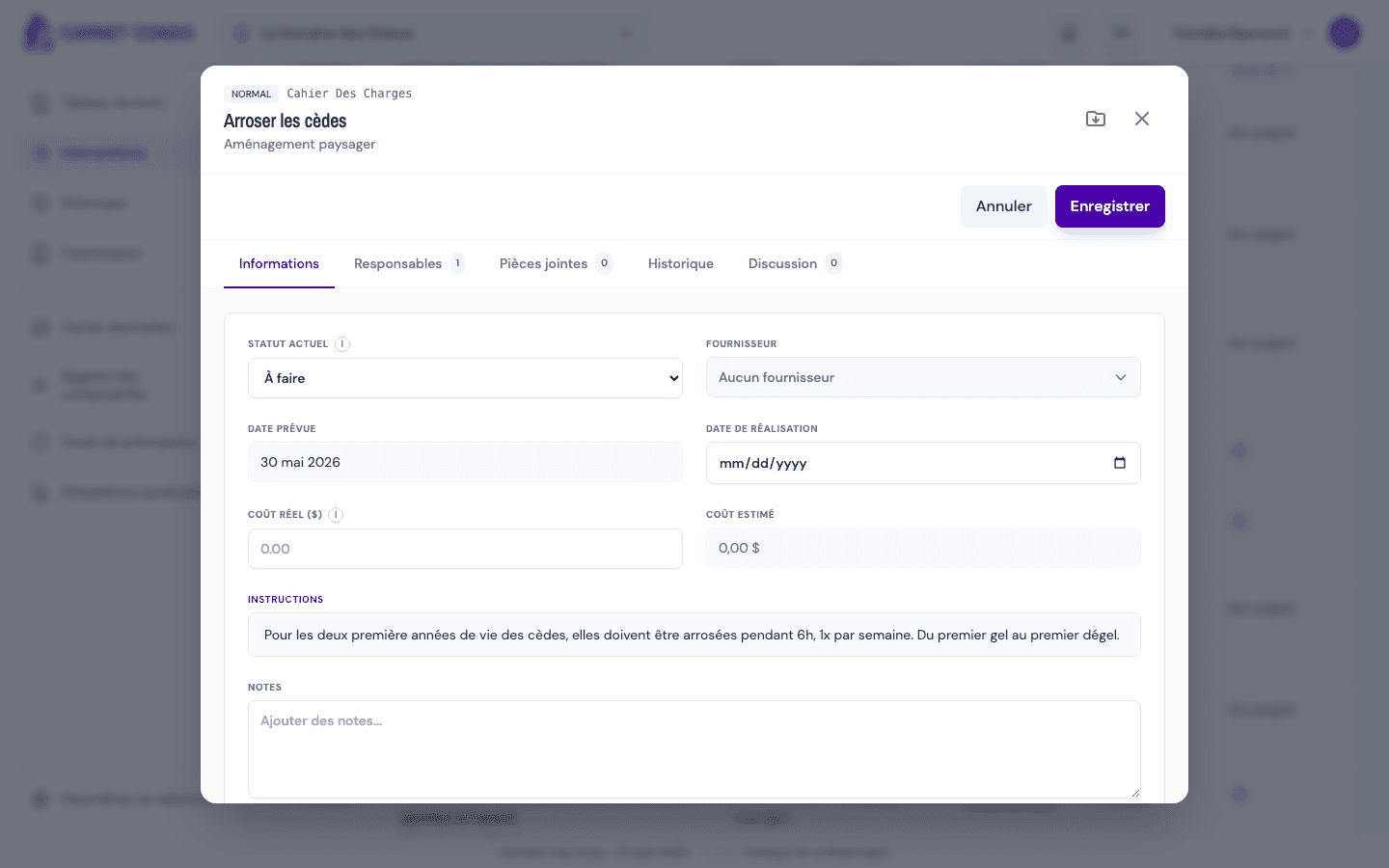
In edit mode, on the Information tab, fill in the completion fields.
-
Supplier: choose from the selector (a "No supplier" option is available). Only the building's active suppliers are offered.
-
Completion date: enter the date on which the work was done. This field is independent of the status.
-
Actual cost ($): enter the amount (decimals are accepted). A tooltip reminds you of the link with the contingency fund.
-
Notes: add any useful comment.
-
Click "Save".
Tips and common errors
- Supplier not found: if it does not appear, check that it is active in the building's supplier records.
- Decimal cost: the actual cost accepts cents; use the numeric format expected by your device.
- Free date: you can enter the completion date without changing the status; it does not switch the intervention to Compliant.