
Delete my account
Permanently delete your account from the My account window, and what happens to your data.
- Audience
- Everyone
- Screen
- "My account" window, Delete my account section
- Verified version
- App 1.0.0
Goal
Permanently close your account and have your personal information anonymized.
Audience
All signed-in users.
Prerequisites
- Be signed in.
- If you are the last administrator of a building that is still billed: appoint another administrator, or remove the card on file, before deleting your account.
Steps
-
Open the user menu (top right), then click My account.
-
Scroll down to the last section, Delete my account (red box).
-
Read the warning. If you administer a building that is still billed, a notice reminds you.
-
In the "To confirm, type SUPPRIMER" field, type the word
SUPPRIMER. The button stays disabled until the word matches.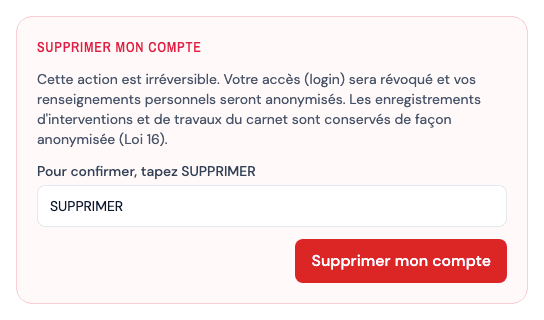
-
Click Delete my account.
-
A message confirms "Your account has been deleted." and the application returns to the sign-in screen.
Irreversible action
Your access is revoked and your personal information is anonymized. The maintenance and works records you entered remain in the logbook in anonymized form: the maintenance logbook must be kept (Loi 16).
Billing follows the building, not you
The subscription is attached to the building: it keeps charging the card on file after you leave. Hence the prerequisite above if you are the last administrator.
Tips and common errors
- Keep a copy before leaving: export your data first; deletion is permanent.
- "Could not delete your account.": nothing was deleted; try again.
See also
Export my personal data
Download a copy of your personal information from the My account window.
View the intervention history
Open the History tab of the menu: every completed, cancelled or postponed intervention in the building, grouped by year, with its completion date and the person who completed it.